This website uses cookies to improve your experience. We\'ll assume you\'re ok with this, but you can opt-out if you wish. Read More
How to Find Your Driver Swing Speed at Golf Galaxy, Dick’s, and Local Pro Shops
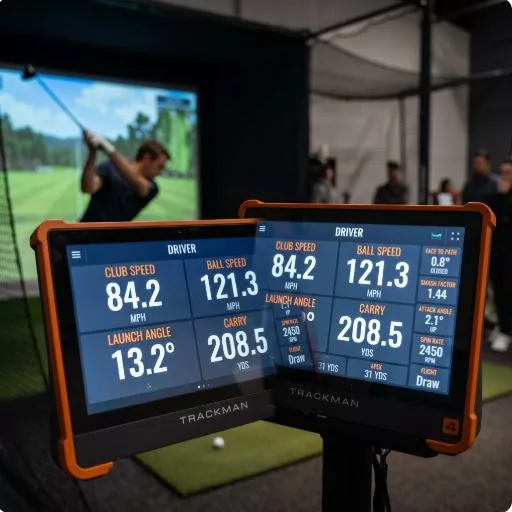
Quick answer: Golf Galaxy, PGA Tour Superstore, and most local pro shops offer free or low-cost swing speed measurement using professional launch monitors.
At Golf Galaxy and PGA Tour Superstore, you can walk in without an appointment, hit balls into their simulator bays, and get your swing speed, ball speed, launch angle, and carry distance measured in about 15 minutes at no charge.
Dick’s Sporting Goods locations with a Golf section offer a similar service at select stores. Local pro shops vary — some have launch monitors, others use simpler radar devices.
Most golfers estimate their swing speed from driving distance…If you can’t get to a store, see our guide to estimating swing speed without a launch monitor.
This guide walks through exactly what to do at each location and what to ask for when you get there.
Why Getting a Real Swing Speed Reading Is Worth 15 Minutes of Your Time
If you’ve been researching draw-bias drivers like the Performance Golf SF2, you’ve already seen that shaft flex selection depends entirely on swing speed.
Ladies Flex for under 65 MPH, Senior Flex for 70-80 MPH, Regular Flex for 80-90 MPH — pick the wrong one and the slice correction technology you’re paying for gets partially or fully undermined by a shaft that doesn’t load and release correctly for your swing.
Most golfers estimate their swing speed from driving distance, which is a reasonable approximation. But if you’ve been slicing badly for years, your driving distance is artificially suppressed — the lateral curve is robbing you of carry distance and making your actual swing speed look lower than it is.
A golfer genuinely swinging at 88 MPH but losing 25 yards to a severe slice might estimate their speed at 78-80 MPH from distance alone and select the wrong flex as a result.
A 15-minute free session on a professional launch monitor removes all of that guesswork and gives you a number you can use with confidence for every equipment decision going forward.
Golf Galaxy: The Most Accessible Option for Most Golfers
Golf Galaxy locations are the most widely available dedicated golf retail chain in the US, and they have the most standardized launch monitor setup of any option on this list.
What they use: Most Golf Galaxy locations use Trackman or Foresight GC Quad launch monitors — the same professional-grade systems used by PGA Tour fitting carts and top club fitters nationwide. These are not consumer-grade devices. They measure clubhead speed, ball speed, smash factor, launch angle, spin rate, carry distance, and total distance simultaneously on every swing.
How to get measured: Walk in during a non-peak time — weekday mornings and early afternoons are best. Approach the fitting desk or hitting bay area and tell a staff member you’re researching a driver purchase and want to hit a few balls to get your swing speed measured.
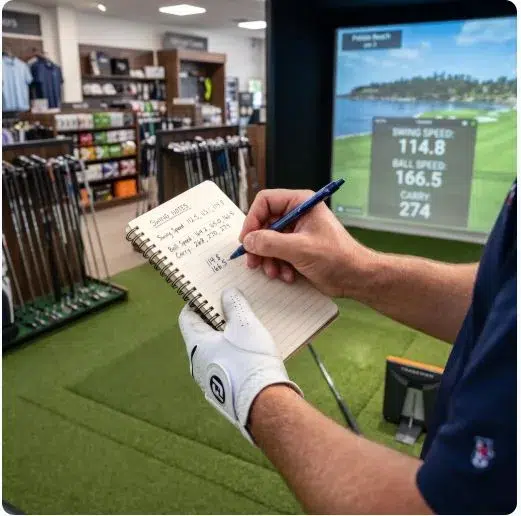
In most locations this is completely free and requires no appointment. Some locations ask you to book a fitting appointment, which is also typically free for a basic session.
What to bring: Your current driver if you have one, or ask to hit one of their demo drivers. Wear golf shoes if you have them and bring your glove. Consistency of setup matters for accurate readings — hitting in street shoes without a glove introduces variables that can affect your numbers.
What to ask for specifically: Tell the staff member you want to know your average clubhead speed, ball speed, and carry distance across 8-10 swings. You don’t need a full fitting session with shaft recommendations — just the raw numbers. A good staff member will show you the Trackman or GC Quad screen directly and walk through what the numbers mean.
What you’ll see on the screen:
- Club Speed: This is your swing speed — the number you need for shaft flex selection
- Ball Speed: Typically 1.4-1.5x your club speed on solid strikes
- Smash Factor: Ball speed divided by club speed — a measure of contact quality
- Launch Angle: How steeply the ball launches off the face
- Carry Distance: How far the ball travels through the air before landing
- Total Distance: Carry plus roll
Write down your average Club Speed across your representative swings — not your best swing, not your worst, but the number that appears most consistently across your session.
PGA Tour Superstore: Best for a Full Fitting Experience
PGA Tour Superstore locations are typically larger than Golf Galaxy stores and offer a more comprehensive fitting experience, though the walk-in swing speed measurement process is similar.
What they use: PGA Tour Superstore fitting bays typically use Trackman, though some locations use FlightScope or Foresight systems. All of these are professional-grade and produce reliable, accurate readings.
The difference from Golf Galaxy: PGA Tour Superstore fitting staff tend to be more proactively fitting-oriented — they may want to take you through a more complete fitting process including shaft recommendations and head comparisons.
This is valuable if you’re open to it, but if you just want your swing speed number quickly, be upfront: tell them you’re researching a specific driver purchase online and just need your baseline swing speed confirmed before ordering.
Booking: PGA Tour Superstore offers both walk-in and appointment fitting. For a basic swing speed measurement, walk-in during off-peak hours works fine. For a more comprehensive session that includes trying multiple driver heads and shafts, booking an appointment ensures you get dedicated one-on-one time with a fitter.
What to ask for: Same as Golf Galaxy — average clubhead speed across 8-10 representative swings with a driver. Ask them to show you the launch monitor screen directly so you can record your own numbers.
Dick’s Sporting Goods: Available at Select Locations
Not all Dick’s Sporting Goods locations have launch monitor capability — it depends on whether the specific store has a dedicated Golf section with a hitting bay.
How to check before you go: Call your local Dick’s and ask specifically whether their golf section has a launch monitor or simulator bay. Don’t ask if they do “fittings” — ask specifically about launch monitor capability, because some locations offer basic swing speed measurement with simpler radar devices rather than full launch monitor systems.
What they use: Dick’s Golf fitting bays at equipped locations use a range of systems — some have Trackman, others use simpler Doppler radar devices that measure swing speed and ball speed but fewer secondary metrics than a full launch monitor. Either is sufficient for getting your swing speed number.
The experience: Dick’s fitting staff vary more in expertise than dedicated golf retail chains. At some locations you’ll get a knowledgeable golf staff member who can walk you through your numbers meaningfully. At others you may be largely self-guided. Either way, the number on the screen is what you need.
Local Pro Shops: The Underrated Option
Golf course pro shops are significantly underutilized for swing speed measurement, and in many cases they’re the most convenient option for golfers who live near a golf course but not near a major retail chain.
What to expect: Pro shop launch monitor capability varies widely. High-end private clubs and resort courses often have Trackman or GC Quad systems in their fitting rooms. Public course pro shops may have simpler radar devices, a basic launch monitor, or in some cases no measurement capability beyond a basic swing speed radar.
How to approach it: Call ahead and ask if they have a launch monitor and whether you can book 15 minutes to get your swing speed measured. Most pro shop staff are happy to accommodate this request, particularly if you mention you’re considering a driver purchase — they may want to show you their demo inventory at the same time.
The advantage of a local pro shop: You’re often dealing with a PGA Professional or an experienced club fitter who plays the same course you do and understands the conditions you’re actually playing in. The conversation around your swing speed and equipment fit can be more contextually relevant than a retail chain fitting room.
Cost: Some pro shops charge a nominal fitting fee ($20-$50) for a session. Many do it at no charge as a goodwill service for course members or regular customers. Ask when you call.
What to Do With Your Swing Speed Numbers Once You Have Them
Once you have your average clubhead speed from a professional launch monitor, apply it directly to the driver fitting matrix you need.
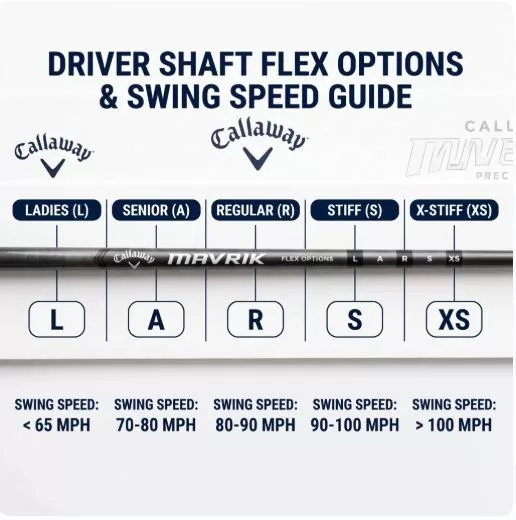
| Your Average Club Speed | Recommended SF2 Flex |
|---|---|
| Under 65 MPH | Ladies Flex |
| 65-70 MPH | Ladies or Senior Flex |
| 70-80 MPH | Senior / Soft Flex |
| 80-90 MPH | Regular Flex |
| 90-100 MPH | Stiff Flex |
| 100+ MPH | X-Stiff Flex |
Record three numbers from your session:
- Your average club speed across all swings
- Your fastest club speed (your ceiling)
- Your most common club speed (the number that appears most frequently)
Use the most common club speed for flex selection — not the average, which can be pulled up by one or two big swings, and not the ceiling, which represents your best effort rather than your consistent swing.
The slicer adjustment: If your session showed significant variation in ball speed and carry distance from swing to swing — some shots carrying 210 yards, others only 175 — that variation is partly from your slice affecting some swings more than others.
Your club speed number is still reliable since it measures the club rather than the resulting ball flight, but note that your distance numbers in the session may not reflect what a draw-bias driver would produce once your ball flight straightens out.
What Other Numbers to Record While You’re There
Since you’re already on a launch monitor, take 60 extra seconds to record these numbers — they’ll be useful for future equipment decisions beyond just shaft flex:
Launch angle: Ideally 12-15° for most recreational swing speeds. Under 10° suggests you need more loft in your driver. Over 17° suggests the ball is launching too high and losing forward momentum.
Spin rate: Ideally 2,000-3,000 RPM for most recreational drivers. Very high spin (over 3,500 RPM) often accompanies slicing — it confirms the sidespin problem and shows how much energy is going into curve rather than distance.
Smash factor: A measure of contact quality — 1.40 or higher indicates solid center-face contact. Below 1.35 suggests off-center contact that a higher-MOI driver would help with.
Attack angle: Negative numbers (e.g. -3°) mean you’re hitting down on the ball; positive means hitting up. Most slicers hit down. If your attack angle is -4° or steeper, you need more loft than your swing speed alone suggests.
Frequently Asked Questions
Is swing speed measurement at Golf Galaxy really free? In most locations, yes — basic swing speed measurement during a walk-in session is provided at no charge. Some locations may charge for extended fitting sessions with multiple driver comparisons and full shaft fitting. Confirm with your specific location when you call or visit.
How long does a basic swing speed measurement take? About 15-20 minutes including setup time. You’ll hit 8-12 balls, the staff member will show you your numbers, and you’ll have everything you need.
Do I need to buy anything after getting measured? No — you’re under no obligation to purchase. Retail fitting sessions are a service designed to build relationships and guide you toward their inventory, but there is no pressure requirement and you are free to use your numbers for an online purchase elsewhere.
Can I bring my own driver to the session? Yes — and it’s recommended. Measuring your swing speed with your current driver gives you a baseline that reflects your actual setup. If you also want to try demo drivers from their inventory, most fitting staff will accommodate that in the same session.
What if my swing speed is different every time I test? Some variation is normal — swing speed fluctuates with warm-up, fatigue, and effort level. A range of plus or minus 3-5 MPH across a session is normal. If your speed varies by more than 8-10 MPH from swing to swing, that indicates significant swing inconsistency that a fitting session alone won’t resolve.
Is there a best time of day to go for a swing speed measurement? Weekday mornings between 10am and noon are typically the least busy at major golf retail chains. Weekend afternoons are the most crowded and you’re more likely to wait for a hitting bay or get less one-on-one time with fitting staff.
This guide reflects general retail fitting practices at major golf chains as of 2026. Store policies, launch monitor availability, and fitting fees vary by location — call ahead to confirm availability before visiting.
Related Post

Fall Golf Clothes: Essential Layering Guide for Optimal Performance on the Course
Fall Golf Clothes: Essential Layering Guide for Optimal Performance on the Course Fall weather usually [...]
Are Golf Discount Cards Worth It? Only If You’d Play Three of the Courses Anyway
A golf discount card pays for itself when at least three of its courses are [...]